NoriaPDF · 4 minutes
How to create a PDF from receipt photos
Turn separate pictures into an ordered document. Check each image, adjust the layout and keep the original photos.
Prepare readable images
Use the two fictional receipts in this guide or your own images. Avoid shadows, glare, missing edges and blur. Converting to PDF cannot recover detail that the camera did not capture.
Create the document
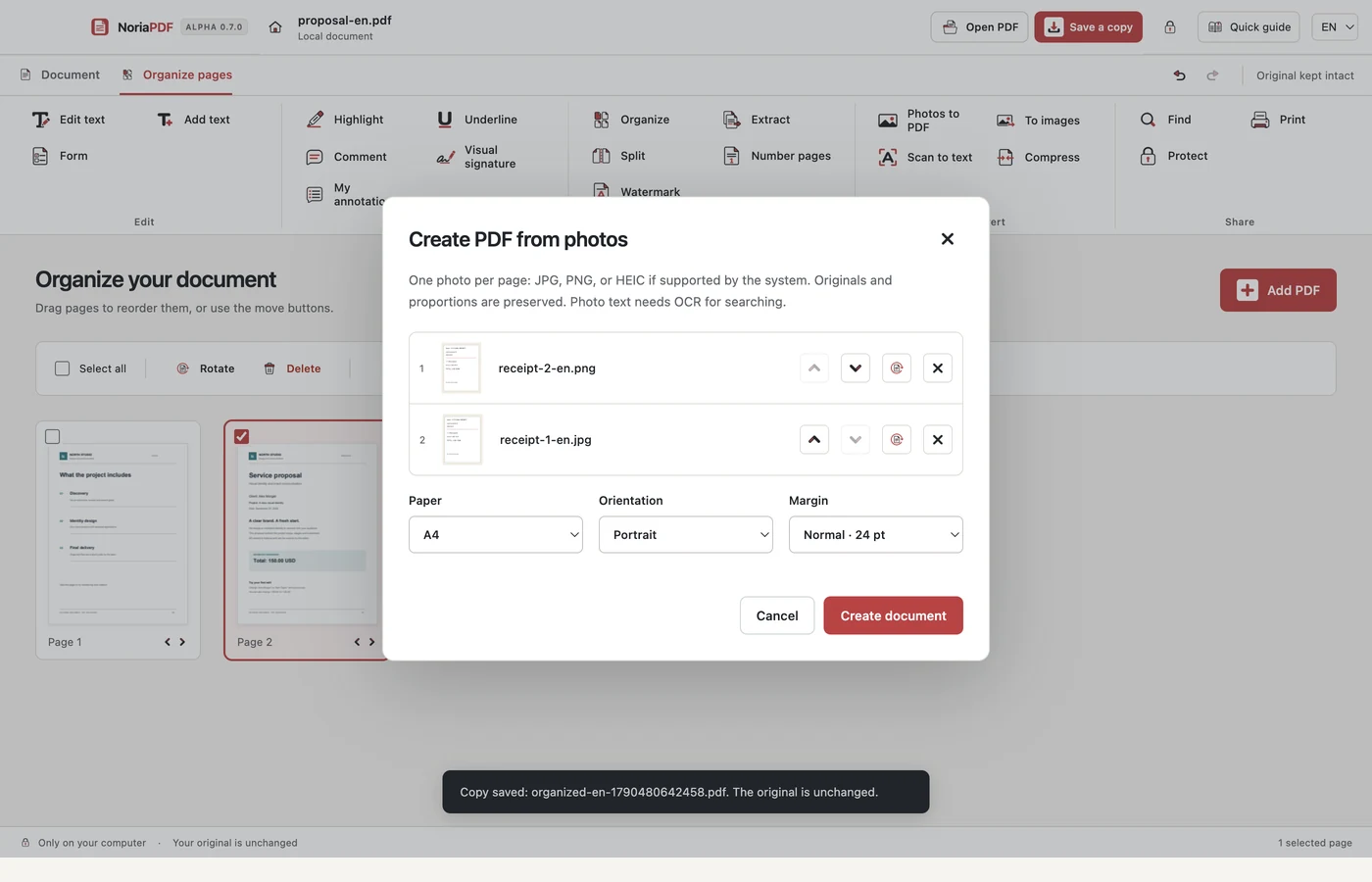
Choose Create PDF from photos and select the images. Check their thumbnails before continuing. This example uses JPEG and PNG; there is no need to convert them on an external website.
Set the order and page layout
Use the order and rotation controls to arrange the receipts. Review paper size, orientation and margins. Check that no important information will be cut off before creating the PDF.
Save and review
Create the document, save a copy and reopen it. Verify the page count and readability of amounts and dates. To search words later, run OCR on the result: creating a PDF and recognizing text are separate operations.
Example result: two sample receipts in one ordered PDF, saved as a new copy.
App demonstration
Real NoriaPDF 0.7.0 demonstration, silent and using fictional documents. The pages video also includes photos to PDF.
Common questions
Are my photos uploaded for conversion?
No. The app prepares the PDF on your device. The website only provides fictional examples to download; it does not receive your receipts.
Can I merge this PDF with another one?
Yes, if both are compatible and respect document size, page and permission limits. Follow the merge and organize guide to add it as an appendix.
Work with your files on your device.
NoriaPDF: US$9.99 for 1 month or US$39.99 for 12 months, up to 2 devices. Accounts and license validation need a connection; see the offline-use terms.
Keep learning
4 minutes
How to edit a PDF without uploading your files
Correct a name or a line of text on your desktop while keeping the original. This example uses compatible text, not a photograph of a document.
5 minutes
Local OCR: search the text in a scanned PDF
A clear-looking scan may contain no searchable text. OCR adds recognized text over the page image without uploading your PDF.
4 minutes
How to merge PDFs and arrange their pages
Combine a proposal and an appendix, put the pages in order and save a document that is easy to review. No document upload is needed.
4 minutes
How to create a PDF from receipt photos
Turn separate pictures into an ordered document. Check each image, adjust the layout and keep the original photos.