NoriaPDF · 4 minutes
How to edit a PDF without uploading your files
Correct a name or a line of text on your desktop while keeping the original. This example uses compatible text, not a photograph of a document.
Start with a copy
Download the sample PDF or open a copy of your document in NoriaPDF. Respect any password or document permissions. Editing behaves differently depending on how a PDF was created.
Select existing text
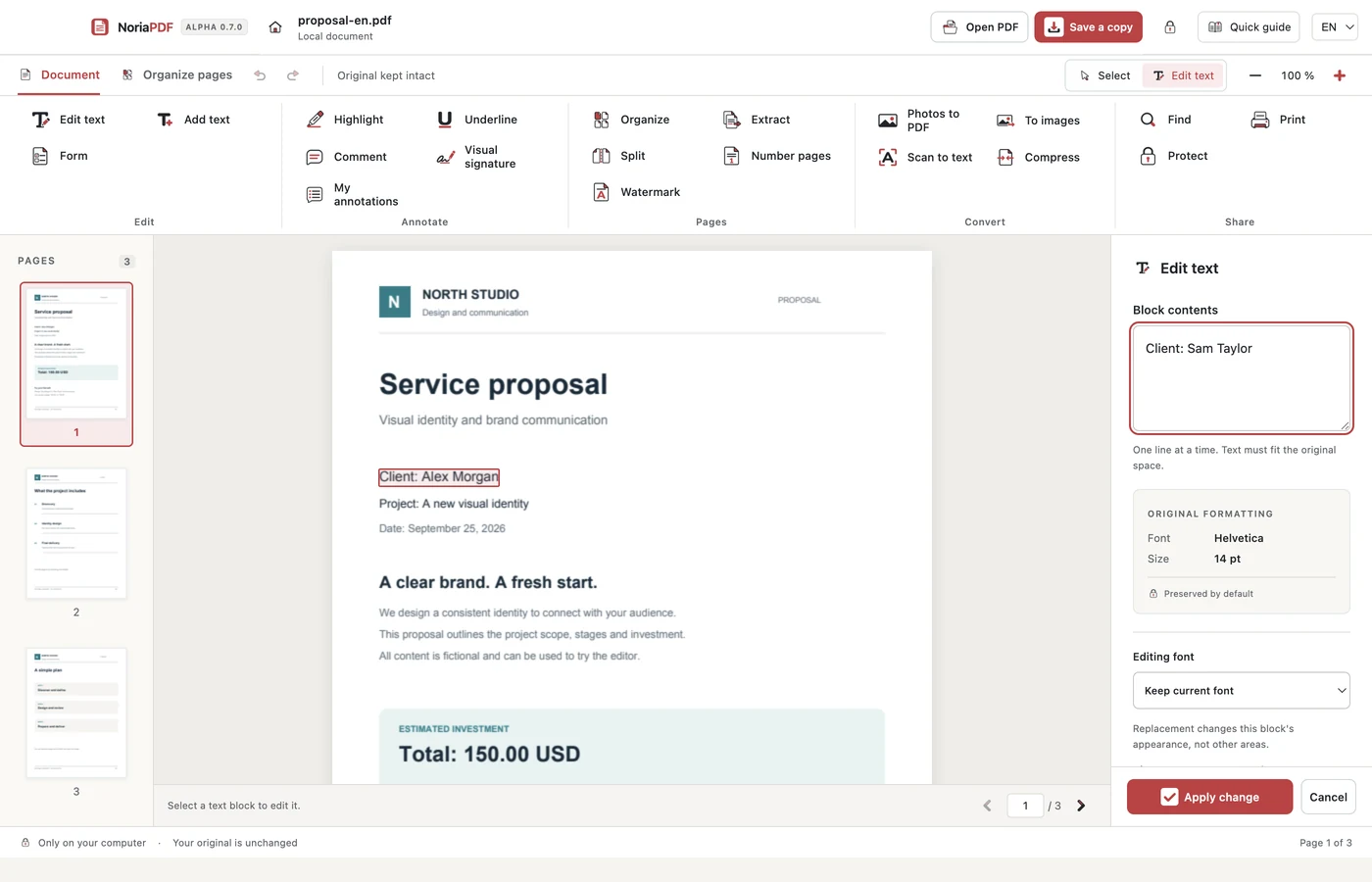
Choose Edit text and select the line you want to correct. In the sample, change “Client: Alex Morgan” to “Client: Sam Taylor”. If no text can be selected, you may be working with a scan; see the OCR guide first.
Apply and review
Enter the replacement and select Apply change. The button stays visible at the bottom of the panel. Text must fit its available space; a much longer sentence may be rejected. Check the size, position and characters. Undo and Redo let you compare.
Save and reopen
Choose Save a copy, use a new filename, then open the saved file in a PDF reader. Check both the corrected line and the unchanged pages before sharing. Saving does not replace reviewing the output.
Example result: a new PDF with the corrected name, with the original preserved.
App demonstration
Real NoriaPDF 0.7.0 demonstration, silent and using fictional documents. The pages video also includes photos to PDF.
Common questions
Is my PDF sent to NoriaPDF?
Not for editing. The document engine runs on your device. Your account, purchases and license checks do use an internet connection.
Is this a free PDF editor?
No. NoriaPDF is sold for 1 or 12 months. You can freely download the sample document; using the app requires an active license.
Work with your files on your device.
NoriaPDF: US$9.99 for 1 month or US$39.99 for 12 months, up to 2 devices. Accounts and license validation need a connection; see the offline-use terms.
Keep learning
4 minutes
How to edit a PDF without uploading your files
Correct a name or a line of text on your desktop while keeping the original. This example uses compatible text, not a photograph of a document.
5 minutes
Local OCR: search the text in a scanned PDF
A clear-looking scan may contain no searchable text. OCR adds recognized text over the page image without uploading your PDF.
4 minutes
How to merge PDFs and arrange their pages
Combine a proposal and an appendix, put the pages in order and save a document that is easy to review. No document upload is needed.
4 minutes
How to create a PDF from receipt photos
Turn separate pictures into an ordered document. Check each image, adjust the layout and keep the original photos.