NoriaPDF · 4 minutes
How to merge PDFs and arrange their pages
Combine a proposal and an appendix, put the pages in order and save a document that is easy to review. No document upload is needed.
Open the main document
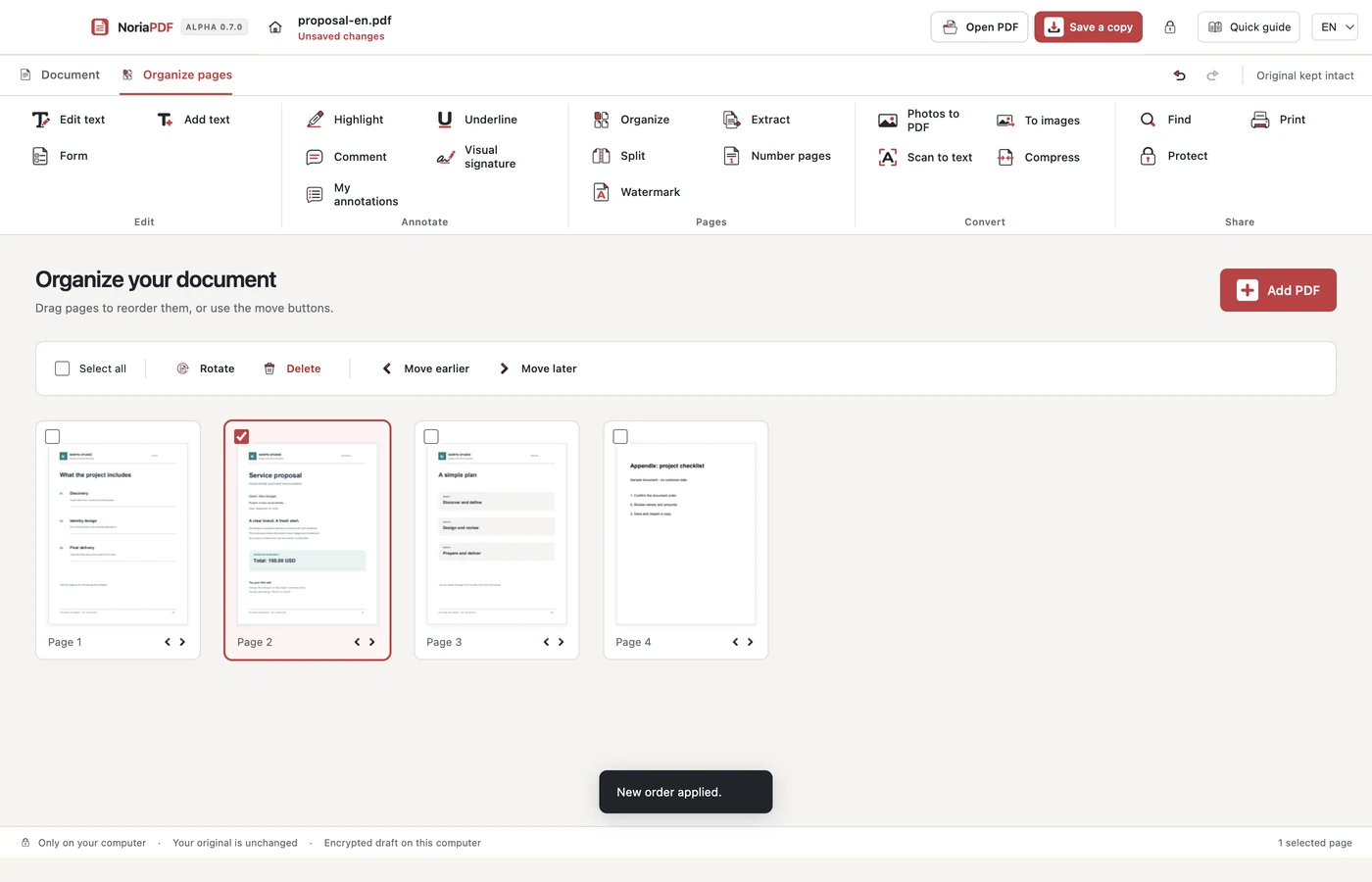
Open the sample proposal and switch to page view. Thumbnails help you check the selection. Before rotating, extracting or deleting, verify which pages are selected.
Add another PDF
Choose Add PDF and select the sample appendix. Check the total page count after importing it. Protected files may require a password or restrict certain operations.
Arrange and rotate
Drag a thumbnail to its new position or use the page movement controls. Select a sideways page and choose Rotate. Undo returns to the previous arrangement if the result is not what you expected.
Prepare the final copy
Review the thumbnails from beginning to end and save a copy with a new name. Open it in another reader and verify the order. If you only need some pages, use Extract and check the selection before saving a separate file.
Example result: a new PDF containing the proposal and appendix in your chosen order.
App demonstration
Real NoriaPDF 0.7.0 demonstration, silent and using fictional documents. The pages video also includes photos to PDF.
Common questions
Can I restore the previous order?
Use Undo during the session. Keep the original too; session history is not a substitute for a backup.
Can I include pages made from photos?
Create a PDF from the photos first, then add it to the other document. The photos guide explains how to check order and orientation.
Work with your files on your device.
NoriaPDF: US$9.99 for 1 month or US$39.99 for 12 months, up to 2 devices. Accounts and license validation need a connection; see the offline-use terms.
Keep learning
4 minutes
How to edit a PDF without uploading your files
Correct a name or a line of text on your desktop while keeping the original. This example uses compatible text, not a photograph of a document.
5 minutes
Local OCR: search the text in a scanned PDF
A clear-looking scan may contain no searchable text. OCR adds recognized text over the page image without uploading your PDF.
4 minutes
How to merge PDFs and arrange their pages
Combine a proposal and an appendix, put the pages in order and save a document that is easy to review. No document upload is needed.
4 minutes
How to create a PDF from receipt photos
Turn separate pictures into an ordered document. Check each image, adjust the layout and keep the original photos.